About WiFi Mouse Pro
Transform your phone into a wireless mouse, keyboard and trackpad for your computer, it enables you to control your laptop effortlessly through a local network connection.When your real mouse, keyboard or controller has...
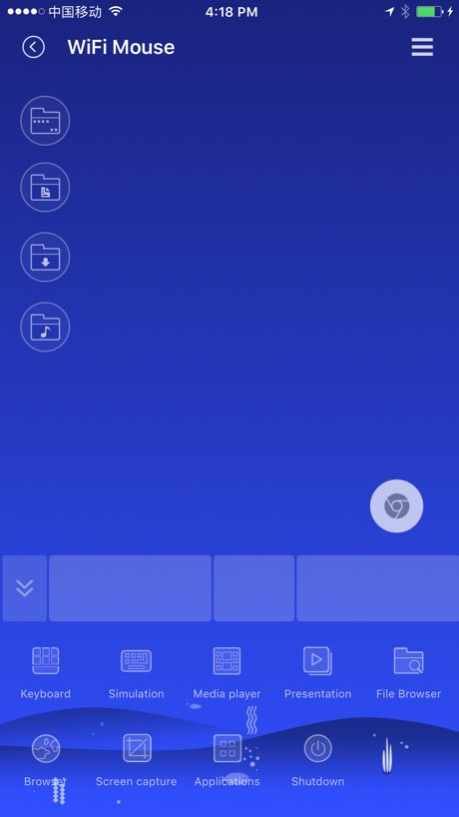
Transform your phone into a wireless mouse, keyboard and trackpad for your computer, it enables you to control your laptop effortlessly through a local network connection.When your real mouse, keyboard or controller has been broken, it can replace them. Now you can relax on the sofa and control Youtube or playing video in the comfort of your own home. Key features: ● Fully Simulated Mouse ● Simulated Computer Keyboard ● Magic Trackpad ● Multi-Touch Gestures ● Shutdown / Sleep Computer Remotely ● Media Controller ● Voice Input Remotely ● Application Launcher ● Screen capture ● Game controller ● Restore last connection when start. ● Browser and open computer files ● Control PPT / Keynote Presentation Remotely ● Compatible with Windows 7/8/10, Mac OS x/Linux Quick setup: ● Download & install mouse server from website http://wifimouse.necta.us ● Make sure your phone and computer at the same network. ● Start app to connect one computer
Version History 1. Simulate keyboard add PgUp/PgDn keys 2. Browser feature support copy & paste URL address, which could be opened by computer 3. Fix remote application(for Mac) bug 1.5.9 04/26/2018 Add Game controller. Fix bugs. 1.5.8 04/12/2018 Fix full screen keyboard issue for iPhoneX. 1.5.7 04/06/2018 Restore last connection when start. 1.5.6 04/03/2018 Add adapting UI for iPhone X 1.5.5 03/21/2018 Cloud ID help you easy to find all your computers via internet after set the same Cloud ID on your phones and computers. 1.5.3 10/31/2017 1. Add sway mode for presentation, sway your phone to make mouse cursor movement. 2. Media controller support Potplayer and Netflix. 3. Fix some bugs. 1.5.1 10/25/2017 Simulate keyboard feature support Russian, English, Korea, French keyboard layout. 1.4.9 08/02/2017 1. Option for show/hide 4 directory shortcuts. 2. Add scroll bar to make scroll easily. 1.4.8 07/06/2017 1. Support YouTube 2. Fix browser zoom in/out 3. Fix bugs. 1.4.7 06/07/2017 1. Support browse and open computer files. 2. Add shortcut for remote personal downloads, documents, music and desktop files. 1.4.6 05/27/2017 1. Add password protection. (When server side set password, App need password to connect to server) 2. Remote app detection. (Main UI show the top running app of the computer, tap the icon of that app to enter controller UI) Notice: Please update mouse server to latest version. 1.4.5 05/11/2017 1, New UI 2, Support screen capture 3, Support control many media player 4, Support show/hide control panel 5, Support 4 themes. Note: please update mouse server for Mac/PC to latest version. 1.4.4 04/26/2017 Support iOS 7. 1.2.1 10/22/2013 Add window control bar,now you can click minimize,maximize/restore,close window button on your iPhone. Please upgrade Mouse Server on your PC/Mac to version 1.5.0.0 1.2 09/07/2013 Fix bugs. 1.1.6 07/27/2013 Add PowerPoint(PPT) presentation tool panel. Task switch buttons on tool bar has been moved to a new task switch panel. Please upgrade MouseServer to version 1.4.0.0 1.1.5 07/09/2013 Add Simplified Chinese language. Fix bugs. 1.1.4 06/21/2013 *Add long press gesture for drag & drop. 1.1.3 06/03/2013 Update some UI elements. Add Keep Awake feature as well as Auto-Dim on idle. Add Auto Reconnect feature. Change cursor & scroll speed range for high precision. bug fix: Fix some bugs with Auto Connect. Fix position of some keyboard buttons. 1.1.2 05/08/2013 Remove in-app purchase,controller feature is free now. Bug fix: Change keyboard type of IP address input(original type may miss dot key for some region format). 1.1.1 04/04/2013 * Optimization of cursor movement for more accurate * Add horizontal scroll on Mac * Add mouse middle button click * New UI style * Change the layout of full sreen keyboard * Volume control was moved to control panel * New controller feature(in-app purchase) remote control of media player & web browser(any media players & web browsers which supports multimedia keyboard) on Windows. remote control of iTunes & Safari on Mac. 1.1 03/27/2013 1.0 01/09/2013
Previous Versions
Here you can find the changelog of WiFi Mouse Pro since it was posted on our website on 2016-09-23 10:02:05.
The latest version is 1.5.9 and it was updated on 2026-10-14 13:40:02. See below the changes in each version.
WiFi Mouse Pro version 1.5.9
Updated At: 2026-10-14
Changes: Version History 1. Simulate keyboard add PgUp/PgDn keys
2. Browser feature support copy & paste URL address, which could be opened by computer
3. Fix remote application(for Mac) bug 1.5.9 04/26/2018 Add Game controller.
Fix bugs. 1.5.8 04/12/2018 Fix full screen keyboard issue for iPhoneX. 1.5.7 04/06/2018 Restore last connection when start. 1.5.6 04/03/2018 Add adapting UI for iPhone X 1.5.5 03/21/2018 Cloud ID help you easy to find all your computers via internet after set the same Cloud ID on your phones and computers. 1.5.3 10/31/2017 1. Add sway mode for presentation, sway your phone to make mouse cursor movement.
2. Media controller support Potplayer and Netflix.
3. Fix some bugs. 1.5.1 10/25/2017 Simulate keyboard feature support Russian, English, Korea, French keyboard layout. 1.4.9 08/02/2017 1. Option for show/hide 4 directory shortcuts.
2. Add scroll bar to make scroll easily. 1.4.8 07/06/2017 1. Support YouTube
2. Fix browser zoom in/out
3. Fix bugs. 1.4.7 06/07/2017 1. Support browse and open computer files.
2. Add shortcut for remote personal downloads, documents, music and desktop files. 1.4.6 05/27/2017 1. Add password protection. (When server side set password, App need password to connect to server)
2. Remote app detection. (Main UI show the top running app of the computer, tap the icon of that app to enter controller UI)
Notice: Please update mouse server to latest version. 1.4.5 05/11/2017 1, New UI
2, Support screen capture
3, Support control many media player
4, Support show/hide control panel
5, Support 4 themes.
Note: please update mouse server for Mac/PC to latest version. 1.4.4 04/26/2017 Support iOS 7. 1.2.1 10/22/2013 Add window control bar,now you can click minimize,maximize/restore,close window button on your iPhone.
Please upgrade Mouse Server on your PC/Mac to version 1.5.0.0 1.2 09/07/2013 Fix bugs. 1.1.6 07/27/2013 Add PowerPoint(PPT) presentation tool panel.
Task switch buttons on tool bar has been moved to a new task switch panel.
Please upgrade MouseServer to version 1.4.0.0 1.1.5 07/09/2013 Add Simplified Chinese language.
Fix bugs. 1.1.4 06/21/2013 *Add long press gesture for drag & drop. 1.1.3 06/03/2013 Update some UI elements.
Add Keep Awake feature as well as Auto-Dim on idle.
Add Auto Reconnect feature.
Change cursor & scroll speed range for high precision.
bug fix:
Fix some bugs with Auto Connect.
Fix position of some keyboard buttons. 1.1.2 05/08/2013 Remove in-app purchase,controller feature is free now.
Bug fix:
Change keyboard type of IP address input(original type may miss dot key for some region format). 1.1.1 04/04/2013 * Optimization of cursor movement for more accurate
* Add horizontal scroll on Mac
* Add mouse middle button click
* New UI style
* Change the layout of full sreen keyboard
* Volume control was moved to control panel
* New controller feature(in-app purchase)
remote control of media player & web browser(any media players & web browsers which supports multimedia keyboard) on Windows.
remote control of iTunes & Safari on Mac. 1.1 03/27/2013 1.0 01/09/2013
WiFi Mouse Pro version 1.5.9
Updated At: 2026-09-05
Changes: Version History This app has been updated by Apple to prepare for watchOS 27 compatibility. No new features are included.
1. Simulate keyboard add PgUp/PgDn keys
2. Browser feature support copy & paste URL address, which could be opened by computer
3. Fix remote application(for Mac) bug 1.5.9 04/26/2018 Add Game controller.
Fix bugs. 1.5.8 04/12/2018 Fix full screen keyboard issue for iPhoneX. 1.5.7 04/06/2018 Restore last connection when start. 1.5.6 04/03/2018 Add adapting UI for iPhone X 1.5.5 03/21/2018 Cloud ID help you easy to find all your computers via internet after set the same Cloud ID on your phones and computers. 1.5.3 10/31/2017 1. Add sway mode for presentation, sway your phone to make mouse cursor movement.
2. Media controller support Potplayer and Netflix.
3. Fix some bugs. 1.5.1 10/25/2017 Simulate keyboard feature support Russian, English, Korea, French keyboard layout. 1.4.9 08/02/2017 1. Option for show/hide 4 directory shortcuts.
2. Add scroll bar to make scroll easily. 1.4.8 07/06/2017 1. Support YouTube
2. Fix browser zoom in/out
3. Fix bugs. 1.4.7 06/07/2017 1. Support browse and open computer files.
2. Add shortcut for remote personal downloads, documents, music and desktop files. 1.4.6 05/27/2017 1. Add password protection. (When server side set password, App need password to connect to server)
2. Remote app detection. (Main UI show the top running app of the computer, tap the icon of that app to enter controller UI)
Notice: Please update mouse server to latest version. 1.4.5 05/11/2017 1, New UI
2, Support screen capture
3, Support control many media player
4, Support show/hide control panel
5, Support 4 themes.
Note: please update mouse server for Mac/PC to latest version. 1.4.4 04/26/2017 Support iOS 7. 1.2.1 10/22/2013 Add window control bar,now you can click minimize,maximize/restore,close window button on your iPhone.
Please upgrade Mouse Server on your PC/Mac to version 1.5.0.0 1.2 09/07/2013 Fix bugs. 1.1.6 07/27/2013 Add PowerPoint(PPT) presentation tool panel.
Task switch buttons on tool bar has been moved to a new task switch panel.
Please upgrade MouseServer to version 1.4.0.0 1.1.5 07/09/2013 Add Simplified Chinese language.
Fix bugs. 1.1.4 06/21/2013 *Add long press gesture for drag & drop. 1.1.3 06/03/2013 Update some UI elements.
Add Keep Awake feature as well as Auto-Dim on idle.
Add Auto Reconnect feature.
Change cursor & scroll speed range for high precision.
bug fix:
Fix some bugs with Auto Connect.
Fix position of some keyboard buttons. 1.1.2 05/08/2013 Remove in-app purchase,controller feature is free now.
Bug fix:
Change keyboard type of IP address input(original type may miss dot key for some region format). 1.1.1 04/04/2013 * Optimization of cursor movement for more accurate
* Add horizontal scroll on Mac
* Add mouse middle button click
* New UI style
* Change the layout of full sreen keyboard
* Volume control was moved to control panel
* New controller feature(in-app purchase)
remote control of media player & web browser(any media players & web browsers which supports multimedia keyboard) on Windows.
remote control of iTunes & Safari on Mac. 1.1 03/27/2013 1.0 01/09/2013
WiFi Mouse Pro version 1.5.9
Updated At: 2026-08-26
Changes: Version History This update from Apple will improve the functionality of this app. No new features are included.
1. Simulate keyboard add PgUp/PgDn keys
2. Browser feature support copy & paste URL address, which could be opened by computer
3. Fix remote application(for Mac) bug 1.5.9 04/26/2018 Add Game controller.
Fix bugs. 1.5.8 04/12/2018 Fix full screen keyboard issue for iPhoneX. 1.5.7 04/06/2018 Restore last connection when start. 1.5.6 04/03/2018 Add adapting UI for iPhone X 1.5.5 03/21/2018 Cloud ID help you easy to find all your computers via internet after set the same Cloud ID on your phones and computers. 1.5.3 10/31/2017 1. Add sway mode for presentation, sway your phone to make mouse cursor movement.
2. Media controller support Potplayer and Netflix.
3. Fix some bugs. 1.5.1 10/25/2017 Simulate keyboard feature support Russian, English, Korea, French keyboard layout. 1.4.9 08/02/2017 1. Option for show/hide 4 directory shortcuts.
2. Add scroll bar to make scroll easily. 1.4.8 07/06/2017 1. Support YouTube
2. Fix browser zoom in/out
3. Fix bugs. 1.4.7 06/07/2017 1. Support browse and open computer files.
2. Add shortcut for remote personal downloads, documents, music and desktop files. 1.4.6 05/27/2017 1. Add password protection. (When server side set password, App need password to connect to server)
2. Remote app detection. (Main UI show the top running app of the computer, tap the icon of that app to enter controller UI)
Notice: Please update mouse server to latest version. 1.4.5 05/11/2017 1, New UI
2, Support screen capture
3, Support control many media player
4, Support show/hide control panel
5, Support 4 themes.
Note: please update mouse server for Mac/PC to latest version. 1.4.4 04/26/2017 Support iOS 7. 1.2.1 10/22/2013 Add window control bar,now you can click minimize,maximize/restore,close window button on your iPhone.
Please upgrade Mouse Server on your PC/Mac to version 1.5.0.0 1.2 09/07/2013 Fix bugs. 1.1.6 07/27/2013 Add PowerPoint(PPT) presentation tool panel.
Task switch buttons on tool bar has been moved to a new task switch panel.
Please upgrade MouseServer to version 1.4.0.0 1.1.5 07/09/2013 Add Simplified Chinese language.
Fix bugs. 1.1.4 06/21/2013 *Add long press gesture for drag & drop. 1.1.3 06/03/2013 Update some UI elements.
Add Keep Awake feature as well as Auto-Dim on idle.
Add Auto Reconnect feature.
Change cursor & scroll speed range for high precision.
bug fix:
Fix some bugs with Auto Connect.
Fix position of some keyboard buttons. 1.1.2 05/08/2013 Remove in-app purchase,controller feature is free now.
Bug fix:
Change keyboard type of IP address input(original type may miss dot key for some region format). 1.1.1 04/04/2013 * Optimization of cursor movement for more accurate
* Add horizontal scroll on Mac
* Add mouse middle button click
* New UI style
* Change the layout of full sreen keyboard
* Volume control was moved to control panel
* New controller feature(in-app purchase)
remote control of media player & web browser(any media players & web browsers which supports multimedia keyboard) on Windows.
remote control of iTunes & Safari on Mac. 1.1 03/27/2013 1.0 01/09/2013
WiFi Mouse Pro version 1.5.9
Updated At: 2018-04-26
Changes: Apr 26, 2018 Version 1.5.9
This app has been updated by Apple to use the latest Apple signing certificate.
1. Simulate keyboard add PgUp/PgDn keys
2. Browser feature support copy & paste URL address, which could be opened by computer
3. Fix remote application(for Mac) bug
WiFi Mouse Pro version 1.5.9
Updated At: 2018-04-26
Changes: Apr 26, 2018 Version 1.5.9
1. Simulate keyboard add PgUp/PgDn keys
2. Browser feature support copy & paste URL address, which could be opened by computer
3. Fix remote application(for Mac) bug
WiFi Mouse Pro version 1.5.9
Updated At: 2018-04-26
Changes: Apr 26, 2018 Version 1.5.9
This app has been updated by Apple to display the Apple Watch app icon.
1. Simulate keyboard add PgUp/PgDn keys
2. Browser feature support copy & paste URL address, which could be opened by computer
3. Fix remote application(for Mac) bug
WiFi Mouse Pro version 1.5.9
Updated At: 2018-04-26
Changes: This app has been updated by Apple to display the Apple Watch app icon.
1. Simulate keyboard add PgUp/PgDn keys
2. Browser feature support copy & paste URL address, which could be opened by computer
3. Fix remote application(for Mac) bug
WiFi Mouse Pro version 1.2.1
Updated At: 2013-01-09
WiFi Mouse Pro version 1.5.9
Updated At: 1970-01-01
Changes: 2018年4月26日 Version 1.5.9
1. Simulate keyboard add PgUp/PgDn keys
2. Browser feature support copy & paste URL address, which could be opened by computer
3. Fix remote application(for Mac) bug
Disclaimer
Official App Store Link
We do not host WiFi Mouse Pro on our servers. We did not scan it for viruses, adware, spyware or other type of malware. This app is hosted by Apple and passed their terms and conditions to be listed there. We recommend caution when installing it.
The App Store link for WiFi Mouse Pro is provided to you by apps112.com without any warranties, representations or guarantees of any kind, so access it at your own risk.
If you have questions regarding this particular app contact the publisher directly. For questions about the functionalities of apps112.com contact us.